Using Notion as a Blog Post Publishing Tool
TLDR
This blog is now updated entirely using the productivity tool Notion! The previous process for updating and publishing posts proved to be a blocker to me posting as regularly as I wanted to. For each post (and update) I needed to push a .MD file to the Patworld Github repository. This was fine if I had my laptop to hand but most of the writing for these posts happens on my phone when I don’t have signal or have deleted X (for the 100th time) or have a few spare minutes to jot an idea down. The transferring and consolidation of these notes to the repository interrupted my flow and disrupted my writing process. I ended up having lots of mostly finished blogs which I would never post! So therefore, I’ve implemented a solution in which the application I use to take notes is the same application that posts to the website. The work I’ve done to make this possible has already been validated by the Feb 26 playlist post, which only took about a couple of hours to write from no previous notes at all!
Technical Details
What is Notion?
Notion is productivity software. It is significantly more usable than other alternatives such as the Atlassian suite however as it is targeted for both personal and professional use.
Why use Notion?
One of the founding principles of Patworld is that it should have the lowest operating costs possible. Notion has a free desktop application, a free mobile app, free cloud-sync between devices, a free API and free Webhook integration. This means I can write and post blog posts on any device!
How Patworld now works
The blog is represented by a database. Each row of the database is a page. The cells of the database (”Name”, ”Last edited time”, “Live”, “Description”) correlate to attributes in the frontmatter of an individual page.
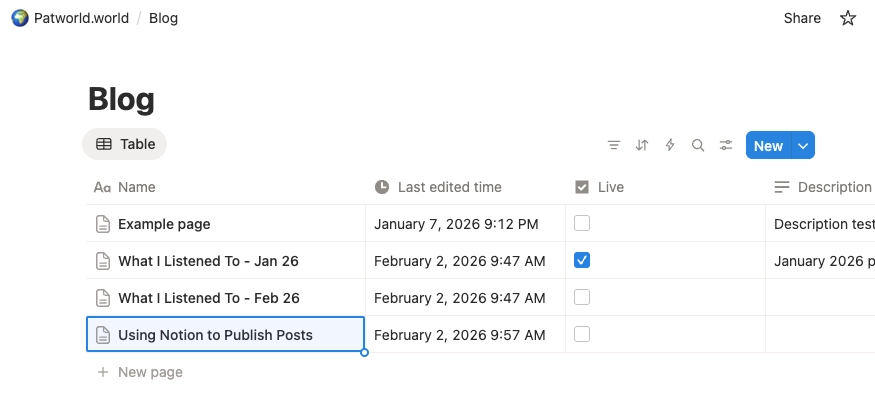
I’ve set up a hook in Notion so that when a page is edited, a request is sent to a Cloudflare worker which triggers a deploy of the website.
Patworld uses 11ty. It’s free, fast and extendable. In the build process, I’ve implemented a hook that runs before build. It fetches the pages from Notion using Notion’s provided (and free) API client.
Each page is then converted to markdown using (free) NotionToMd (the original representation is a tree of different blocks of content which is quite typical for most CMSs).
We need to download and save images before the build process begins. This is because the Notion API returns temporary links to files, so therefore we can’t directly use the returned image URLs. For each image, the markdown is then updated to reference the location of the downloaded image instead of the Notion URL.
The final step before building is to prepend the frontmatter to each blog post. Since the frontmatter is in YAML format, we use a package to convert the attributes of each post into YAML and then prepend the resulting string to each post.
Future optimisation
I’m just starting to use this new way of posting but I can already see some ways to make it better. I could for example detect if a post is still a draft (”Live” is unchecked) and exclude it from the build process. Additionally, I could use the timestamps of the posts and exclude it from a build if it’s not been updated since the last build. In the future it would be good to be able to create a forkable template, so that it’s easy for others to setup a website in similar manner.
- Previous: What I Listened To - Feb 26